Fewer interruptions
Banners, pop-ups and auto-playing video units are removed or hidden, so you can read or watch without constantly dismissing things.

Ad blocking guide
A plain-English guide to ad blocking: what it removes, how it works, where it falls short, and how to pick a setup that fits your browser, devices and privacy goals.
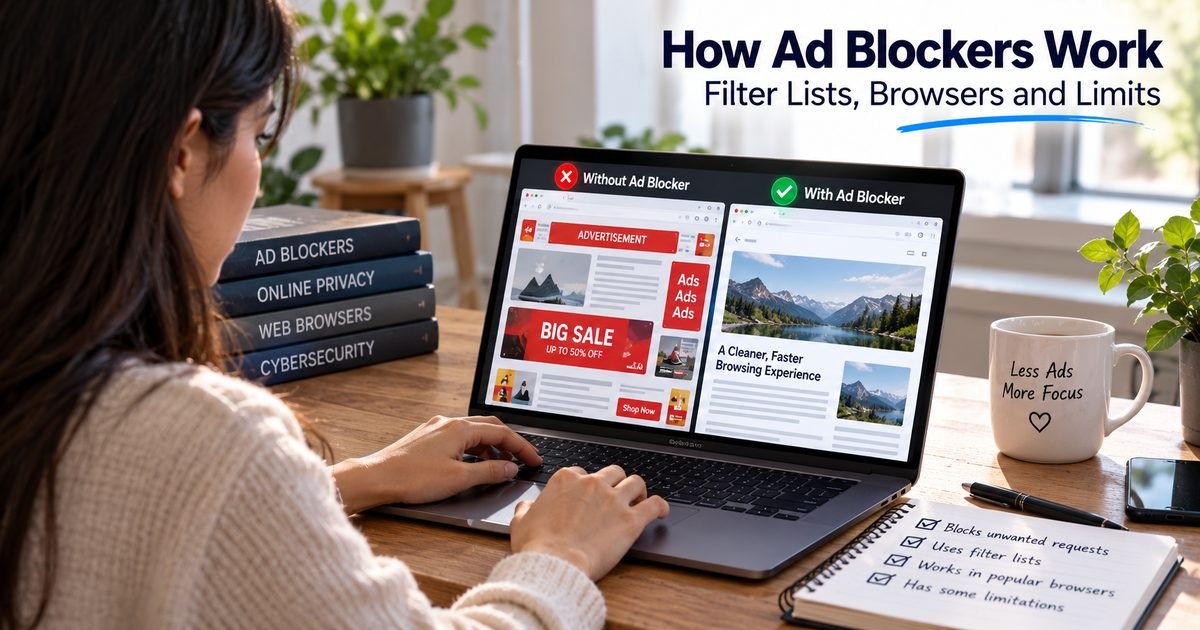
The same simplified article page, shown with and without ad content. This is a mockup to show what blocking changes, not a measurement or a screenshot of a real site.
Illustrative only. Real results depend on the site, your browser, the blocker and its settings, and some ads or sponsored content may still appear.
Banners, pop-ups and auto-playing video units are removed or hidden, so you can read or watch without constantly dismissing things.
With ad slots gone, articles and tools get the space, and layouts jump around less while a page loads.
Many blockers also stop known tracking scripts, which reduces how much of your browsing is reported to advertising networks.
Fraudulent ads can impersonate real brands in search results. The FBI has advised using an ad blocker as one way to reduce that exposure.
Skipping ad and tracker downloads can reduce data use and load time on ad-heavy pages, although how much depends on the site.
You decide which sites you allow, which lists you use, and whether you want the strictest setting or a lighter one.
The product featured on this page is Total Adblock, made by Total Security Limited. The details below come from its official website and help center, so treat them as the vendor's own descriptions rather than independent test results, and expect real-world results to vary.
The vendor says it blocks pop-ups, banner ads, video ads, autoplay video and notification prompts, using filters built to recognize ad-network addresses and scripts.
The vendor says it blocks third-party trackers, scripts and cookies, which it describes as limiting tracking across websites and apps. Blocking trackers reduces cross-site tracking, but it does not make you anonymous.
Per its help center, it blocks requests made to load ads, and it can also hide ads and pop-ups that have already loaded by modifying how the page's HTML and CSS are displayed.
The vendor says it blocks deceptive ads and dangerous links that could lead to harmful or fraudulent sites. It also states that not every ad or tracker is blocked on every site, so treat it as one layer alongside careful clicking.
You can allow ads on specific websites, and on mobile on specific apps, through a setting the extension labels Acceptable Ads. Blocking resumes when you leave an allowed site.
The vendor says removing ads and trackers makes pages load faster and, on mobile, reduces background activity that can use battery. These are the vendor's claims, and the effect depends on the site, device and settings.
As described on the vendor's website, it is available as Android and iOS apps and as an extension for the Chrome, Edge, Safari and Opera desktop browsers, and feature behavior may vary by browser version and platform. The vendor's support center lists Android, iOS, Chrome, Edge and Opera, so confirm that your exact browser and device are supported before you subscribe.
Affiliate link coming soon
Affiliate disclosure: BusinessFade may earn a commission if you buy through an affiliate link on this page, at no extra cost to you. BusinessFade is not the official website of the product featured here. Full disclosure.
Product details were checked against the vendor's official website and help center on 2026-09-24. They can change, and descriptions of benefits are the vendor's own claims.
A single page pulls in text, images and many third-party resources, including ad and tracking services.
It compares each request against filter lists that identify known ad and tracker addresses.
Requests that match are blocked before they download, and leftover empty ad boxes can be hidden.
You see the content you came for, plus any ads or sponsored text the rules could not identify.
Ad blocking is a way of telling your browser, device or network not to load advertising content. When you open a web page, your browser does not receive a single finished document. It assembles the page from dozens of separate requests: the article text, images, fonts, scripts, and often a long list of third-party services that serve ads, measure audiences or track visitors. An ad blocker sits in that process and refuses the requests it recognizes as advertising or tracking.
The result depends on how and where the blocker runs. A browser extension acts inside a single browser. A built-in feature, such as the shields in some privacy-focused browsers, works without installing anything. A DNS-level filter blocks known ad domains for every device on a network. A system-wide app can filter traffic from browsers and some apps together. Each approach has strengths and gaps, which the ad blocker comparison guide walks through in detail.
The most common reason is simply annoyance. Pop-ups, auto-playing video, stacked banners and layouts that shift while you try to read all make pages harder to use. Removing them can make browsing feel calmer, particularly on ad-heavy sites.
Privacy is the second reason. Many ads arrive with scripts that record which pages you visit and build a profile used to target advertising. Blockers that include tracker lists can cut off a large share of that reporting. It is not complete, and our guide to protecting your privacy online covers the other settings that matter.
Security is the third. Criminals buy search ads that impersonate well-known brands and software downloads, and those ads can sit at the very top of results with little to distinguish them from real links. The FBI's Internet Crime Complaint Center has said people can reduce their exposure by using an ad blocker, alongside checking the web address before clicking. A blocker is not a substitute for caution, but it removes a common route for fraud. Our guide to recognizing and avoiding online scams explains the habits that matter most.
Finally, some people block ads to save mobile data or to reduce distraction while they work or study.
Not every ad is a problem, but some formats make pages harder or riskier to use. The most common are pop-ups and pop-unders that open new windows, video that starts playing on its own, often with sound, full-screen interstitials that hide the content until you dismiss them, sticky overlays that cover part of the page, and ads that load late and push the text you were reading out of place. Notification prompts that appear the moment a page opens belong on the same list, because one careless click can subscribe you to a stream of promotions.
One category deserves special care: ads designed to look like system warnings. A message claiming your device is infected, or telling you to call a number or install a tool immediately, is an advertisement or a malicious page, not a message from your device. Close the tab without clicking anything inside it, do not call numbers shown on the page and do not download what it offers. If the page will not close, quit the browser and reopen it without restoring the last session. Blocking removes many of these formats, but it is not a substitute for knowing how to react when one slips through.
Most blockers rely on filter lists, which are community-maintained rule sets describing which requests and page elements look like advertising or tracking. When the blocker sees a request that matches a rule, it stops it before the content downloads. A second layer, often called cosmetic filtering, hides the empty boxes and placeholders that ad slots leave behind. Some blockers add rules that neutralize specific scripts.
How much a blocker can do depends on what the browser allows. Chrome has moved extensions to a newer framework called Manifest V3, which changes how extensions can intercept requests, and some blocker developers have said their Manifest V3 versions are less able to handle sites that resist blocking or to avoid breaking pages. If you use Chrome or another Chromium browser, check that the blocker you choose has a current version built for it. The how it works guide explains these differences in more depth.
Ad blocking is useful, but it has limits, and being clear about them avoids frustration.
It cannot guarantee that every ad disappears. Ads served from the same address as the content, sponsored articles written to look like editorial pages, and ads inserted directly into a video stream are harder for rules to separate from the page itself. Some sites also detect blockers and respond by displaying a notice or restricting content.
It does not make you anonymous. A blocker may stop trackers, but the sites you log in to still know who you are, and your internet provider can still see which sites you connect to. A VPN addresses a different part of the picture, as explained in our guide on whether you need a VPN.
It can also occasionally break a website. Login forms, checkouts, embedded video and comment sections sometimes depend on scripts that a strict rule set blocks by mistake. Most blockers let you pause blocking for a site, and the troubleshooting guide covers how to find and fix the cause.
An ad blocker is one layer of browser privacy, and a few built-in settings strengthen it. Check whether your browser blocks third-party cookies, since those are a common way advertisers follow you between sites. Turn on any tracking-protection setting your browser offers, and review the site permissions list for notifications, location and camera access, removing anything you do not recognize. Clear cookies and site data periodically, especially on shared devices. Remember that private or incognito windows limit what your browser stores locally but do not hide your activity from the sites you visit or from your internet provider. Finally, review your installed extensions, because each one can read the pages you visit, and remove any you no longer use. Our guide to protecting your privacy online covers these settings and the wider picture.
There is no single best option, because the right choice depends on the browser and devices you use, how much control you want, and how you feel about trade-offs such as default allowances for certain ads. A sensible way to decide is to start with where you browse, then compare options against a short list of criteria: platform support, how deeply the blocker filters, how transparent the project is, what its privacy policy says, how it affects performance, and what it costs.
Many capable blockers are free, and some projects offer paid tiers with extra features or support. If you are weighing a subscription, the guide to free versus premium ad blockers explains what paid tiers commonly add and how licenses and renewals usually work. Once you have chosen, the usage guide shows how to install, configure and test it.
Many ad blockers have a free tier and a paid tier, and the details matter more than the headline price. For the product featured on this page, the vendor's website says full access requires a subscription. It lists monthly, quarterly, biannual and annual plans that renew automatically unless cancelled, says introductory pricing may be offered to first-time customers, and says renewals are billed at the regular rate. We do not list prices because they change, so check the vendor's pricing page.
Before you subscribe, it helps to know the following, all of which come from the vendor's own pages and can change:
If you are comparing paid and free options generally, our guide to free versus premium ad blockers explains what paid tiers commonly add and what to check before paying. BusinessFade cannot manage your subscription or account, so use the vendor's own support for those questions.
Many websites rely on advertising to pay for the content you read, so blocking everything everywhere has a cost to publishers. A reasonable middle path is to keep the blocker on by default, allow sites you value and want to support, and consider paying for subscriptions to the publications you read most. That keeps you in control without ignoring where the content comes from.
Treat the blocker itself with the same caution as any software. Install it only from official sources, review the permissions it requests, and keep it updated. The same security habits that protect your accounts, covered in our guide to securing your online accounts, apply to your browser extensions too.
Go deeper on the part that matters to you.
Ad blockers do not detect ads by looking at them. They match requests and page elements against rules, which is why they are powerful, and why they sometimes miss things or break pages.
Installing an ad blocker takes minutes, but a few choices decide whether it works well: where you install it from, which lists you turn on, and how you handle sites it breaks.
There is no single best ad blocker, only the best fit for your browser, devices and priorities. Here is a practical way to compare options and test them fairly.
When ads still appear, or a site breaks after you install a blocker, the cause is usually one of a handful of things. Work through them in order and you will find it quickly.
Many ad blockers are free, and paid tiers usually add extras rather than basic blocking. Here is how to decide whether premium is worth it and how subscriptions and activation typically work.
Ad blocking is software or a setting that stops advertising content from loading or being displayed, usually by matching requests against filter lists and hiding leftover ad elements. It can run as a browser extension, a built-in browser feature, a network-level DNS filter or a system-wide app.
Using an ad blocker on your own device is generally allowed in most countries, but rules vary and this is not legal advice. Websites are also free to ask you to disable your blocker, or to limit access if you do not.
Usually not in a way you would notice. An extension uses some memory, but blocking ad and tracker downloads often offsets that on ad-heavy pages. Results vary by blocker, device and the sites you visit.
It can be, if you choose carefully. Extensions can ask for broad permission to read and change the pages you visit, so install only from the browser's official store, check the publisher and prefer established, well-documented projects.
No. They can reduce tracking by blocking known trackers, but they do not make you anonymous, and sites you log in to still know who you are. Combine blocking with good account security and sensible privacy settings.
Many publishers fund their content with advertising, so some detect blockers and ask you to allow ads, subscribe or disable the blocker. You can allow specific sites you want to support while keeping the blocker on elsewhere.
The vendor's own website describes a free ad blocker and also states that a subscription is required for full access. What each tier includes can change, so check the vendor's pricing page before you decide.
The vendor's website lists Android and iOS apps plus Chrome, Edge, Safari and Opera on desktop, and notes that behavior varies by browser version and platform. Its support center lists Android, iOS, Chrome, Edge and Opera, so confirm that your exact browser and device are supported before you subscribe.
No. The vendor states that not all ads or tracking scripts may be blocked on every site, that results vary by extension, device and platform, and that ads built into mobile apps may not be blockable.
According to the vendor, you cancel in its online portal under My Subscriptions. A refund requires terminating the subscription and asking within 30 days for annual and biannual plans or 14 days for monthly and quarterly plans. Turning off auto-renewal alone does not end access or trigger a refund. Terms can change, so confirm with the vendor.
No. BusinessFade is a separate publisher and is not the vendor. We may earn a commission if you buy through an affiliate link on this page, and we do not provide product, account or billing support. Use the vendor's own support site for those.
Review the vendor's official details, confirm that your browser and device are supported, and read the subscription considerations before you decide.
Affiliate link coming soon
Affiliate disclosure: BusinessFade may earn a commission if you buy through an affiliate link on this page, at no extra cost to you. BusinessFade is not the official website of the product featured here. Full disclosure.
This page contains affiliate content. BusinessFade may earn a commission if you buy through an affiliate link, at no extra cost to you. BusinessFade is not the official Total Adblock website, is not the vendor, and does not provide product, account or billing support. Product details were checked against the vendor's official website and help center on 2026-09-24 and can change, so confirm current features, prices and terms with the vendor.